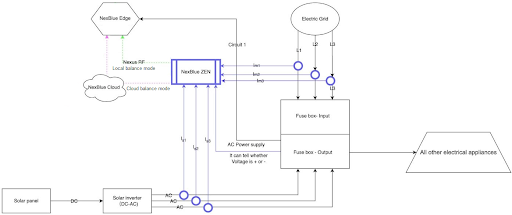
Multiple charge point with one NexBlue Zen
One important thing to remember when it comes to load balancing is that you can only use one NexBlue Zen per location. We do plan to release multi-level load balancing, but for the time being, consider the Zen as a device for measuring grid consumption through the incoming supply and monitoring any additional power generated on-site through solar PV.
The NexBlue product range uses the cloud to communicate with one another where possible. This is the most reliable way to ensure that all charge points behave as intended and that consumption and usage data can be accessed through the Partner Portal.
For locations with multiple charge points installed on one or more circuits, the Zen must either be connected to a local Wi-Fi network or hardwired into an internet-connected data port. This ensures that the Zen can communicate with our cloud. All charge points within a location must also have a reliable internet connection. When installed outdoors, this is usually not an issue, as all our charge points come with built-in, automatically connected eSIMs. If there is a risk that the units will not connect, ensure every charge point is connected to a local Wi-Fi network. Please refer to the detailed schematic below, which illustrates the communication methods:
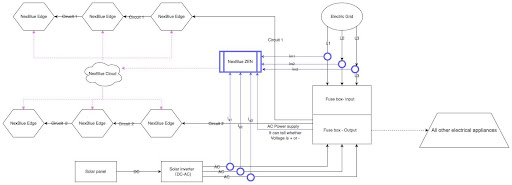
One charger point with one NexBlue Zen
For locations with only one charge point and one NexBlue Zen, we have more options available. As mentioned above, it is always advisable to use the cloud for load balancing. However, if this is not possible or if the signal temporarily drops out, the products will revert to radio frequency communication, which works within a range of up to 100 meters in open air. Please refer to the detailed schematic below, which illustrates the communication methods: